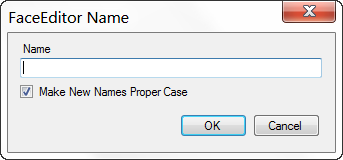
The Name dialog is the main place in FaceEditor where you put the names to the faces. When FaceEditor starts it is the only place you can add or change a person's name. After using the Name dialog to add or change a person's name, their name is added to the top of a most recently used name list where it can be accessed easily by clicking the right mouse button over a face region and simply selecting it from the popup menu.
- Name - Name to be assigned to the current face region.
- Make New Names Proper Case - Change the name entered to proper case by capitalizing only the first character of each word if the name was not found in the contacts.xml file. If Make New Names Proper Case is unchecked the input name will not be changed. Each time the Name dialog is opened Make New Names Proper Case will be checked if Automatically Convert New Names To Proper Case is checked in the Settings dialog.
New Contacts
FaceEditor cannot edit the names in the contacts.ini but it can create and add new ones. Any time a name is entered that can't be found in the contacts.xml file, a new contact is created and added to the file. Next time you open Picasa the new contacts can be found in the People Manager (Tools>People Manager). It will add a new contact for any name that is misspelled or not completed before accepting it. Any contacts that were entered unintentionally must be removed through the People Manager (Tools>People Manager) in Picasa.
Autocomplete
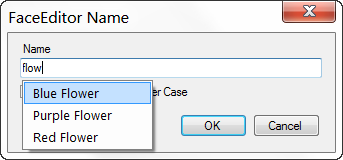
FaceEditor's Name dialog has an autocomplete feature to assist in entering names. As you type in the Name box FaceEditor searches through your list of contacts and suggests names in a list. The first item in the list is highlighted by default and pressing the Enter key will accept it as the name for the person in the face region. You can choose any name in the list by using the Up and Down arrow keys or clicking on one of the items in the list with the left mouse button.
If Close Dialog On Autocomplete List Selection is checked in the Settings dialog the name will be accepted and the Name dialog will be closed. If it is not checked the text of the item chosen from the autocomplete list will be entered into the Name box where it can be either accepted or edited.
If you have entered a name in the Name box and there are any names suggested by the autocomplete feature pressing the Enter key will accept the item selected in the autocomplete list instead of the name entered into the Name box. Pressing the Escape key will dismiss the autocomplete suggestion list.
